Tara Sutherland

Photo Taker | Dog Mom | Digital Consultant | Guards a stash of Maltesers

Category: Uncategorized

  • Over 100,000 views on Flickr

    Over 100,000 views on Flickr

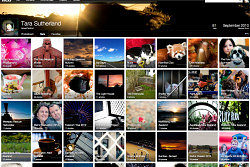
    I was updating my Top Favourites set on Flickr this morning and I had a look at my stats page.
    I’ve recently passed over 100,000 views on Flickr. And that made me happy!

    100000 on Flickr

    Flickr is an easy location for me to store all my images for this blog and for sharing in general.   If I have taken photographs at an event, then this is where they will be.

    I think Flickr is a site that is mainly used by photographers so I’m pretty happy with the number of views and favourites, and the comments, that I have collected over the last 4 years.  Thanks Flickr!

  • Underwater Portfolio Presentation

    Underwater Portfolio Presentation

    This morning I presented my Underwater Portfolio to Dieneke Jansen (Photographer & Senior Lecturer at AUT) as part of the 2013 Festival of Photography.

    The sessions were one on one for 20 minutes held at the NorthArt Gallery in Northcote.

    I didn’t know what to expect from the session or what to prepare so over the last 2 weeks I have refined a set of 26 photographs down to 14, sorted them in an order and flow that I am happy with, had them printed and found a way of presenting them both physically and digitally.

    Before I go any further I have to say a huge thanks to my wonderful friends who came along this morning. As I said before, I didn’t know how the sessions would run and whether other people could hear the reviews but I had a big group for moral support – and it meant a lot!

    Portfolio Review with Dieneke

    Dieneke asked me what I was looking for from the session, what sort of feedback I wanted. I said that she would hopefully see two different styles in the portfolio – ID photographs and what I considered to be more art in style. I was wanting to know whether I was on the right track and did they have the “Wow” factor that would make people stop and look at them and then look some more.

    I presented my work both in printed format and using my iPad.  I found this fantastic app – its called FolioBook Photo Portfolio (by Architek, Limited). It is worth the money! I could add galleries and categories and arrange them how I wanted. I’m pleased I took both.

    We talked through composition and lighting. She called a few of the more I.D. type photographs ‘National Geographic images’ which left me grinning like an idiot and gave me some great suggestions on how to crop them a little differently to make even more of an impact.

    Dieneke recommended that I split the portfolio in to the two different styles and really treat myself one day and get one printed in the style that I would like to see them displayed or in an exhibition.  She has my contact details now so I’m really glad that I took the time to prepare the smaller collages with my name on them and she even said that she would like to spend some with me editing them a little bit more!

    And finally Dieneke suggested I consider studying more (something I have been thinking about) so coming from a Lecturer, that’s a piece of feedback I will be taking on board!

    I’m really pleased I signed up for this review and that I put the preparation in to it.

    A big thanks to Rob Treacher from AM PM for printing my work and making it look lovely, to Anna for helping me find exactly the right portfolio, to Ken for telling me I could do it .. and to everyone who came along today!

    My Underwater Portfolio is here;

    [smugmug url=”feed://tarasutherland.smugmug.com/hack/feed.mg?Type=gallery&Data=29863828_MV98QB&format=rss200″ imagecount=”100″ start=”1″ num=”100″ thumbsize=”Th” link=”smugmug-lightbox” captions=”true” sort=”false” window=”false” smugmug=”false” size=”L”]
  • Presenting my first Portfolio

    Presenting my first Portfolio

    Photographer CollagesThe Auckland Festival of Photography started this week and there are some amazing events – and portfolios on show.

    On Saturday the 8th of June, I will be presenting my portfolio for review at the NorthArt Gallery in Northcote.

    Portfolio Reviews:

    Meet the experts and get your work appraised by a panel of top level curators and camera artists – Dieneke Jansen, Photographer & Senior Lecturer, AUT, Harvey Benge, Curator, Writer, Photographer, Marie Shannon, Photographer and Ron Brownson, Senior Curator, NZ & Pacific Art, Auckland Art Gallery.

    Up until around a week ago, I didn’t even have a portfolio!

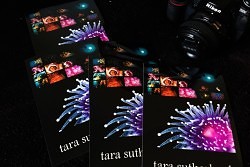
    I read some articles and asked some questions and have come up with something that I am proud of.  I also made these collages to leave with the people that will be doing the reviews (photographers, curators …. experts!)

    It’s all rather nerve racking but exciting as well.

    I’m waiting on the final portfolio to come back from the printers and I am working on my words.

    If you have done a portfolio review – or have been to one – do you have any suggestions for me??

  • How to Time Lapse – Nikon D300 and iMovie

    How to Time Lapse – Nikon D300 and iMovie

    On Sunday night it was rather a nice evening so I decided to try and process a time lapse.
    I had a tripod with me and I haven’t done one of these before and I wanted to know what was involved.

    Nikon D300 Shooting Menu

    Select Interval timer shooting and set interval to 30 seconds.  Set the number of images you want to capture – a couple of hundred should give you around 30 seconds of time lapse video.

    IMG_5928

    IMG_5929

    When you set the camera up on the tripod (or anywhere else where it is secure and won’t move), make sure you set the focus to manual else it may hunt between images.  Also check that your aperture and shutter speed is set correctly for the duration.

    For the sunset photographs below, whilst the aperture was okay, the shutter speed was decreasing in order to cater for the light as the sun went down therefore there is not as much change in the sky as I wanted.

    iMovie

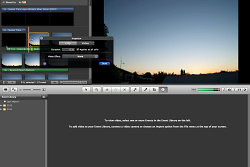
    Import the photographs in to iMovie.
    Select clip adjustments from the left side of one of the images and set the duration of all of the images to 0.1 seconds – “Applies to all stills”.

    TimeLapse_iMovie

    There should be no transitions between the images.

    Play the movie through and ensure that you are happy with it. select some music and add a title.

  • Not Giving In

    Not Giving In

    When the weight of the thoughts in my head start to make me droop, I normally turn to music for a kick in the pants.

    And this is the track that is doing it for me right now.  So if you hear me blasting it, I probably need a wee thumbs up.  Or a high five in the face.